

Frequently Asked Questions
This is a list of frequently-asked questions about OurGroceries, along with our answers.
If this FAQ and the user guide don’t help, you can contact customer support by email. Please note that we receive a high volume of email, but we will do our best to reply promptly.
Our customer support email address is: support@ourgroceries.com.
Table of contents
General questions
- What problem does OurGroceries solve?
- How much does OurGroceries cost?
- Can I pay to get rid of the ads?
- Must I purchase an upgrade for each device I own?
- How do I transfer the upgrade to my new phone?
- What devices is OurGroceries available for?
- How do I get OurGroceries?
- How do I change my email address?
- How do I change my password?
- How do I delete my OurGroceries account?
Features
- Do I have to type in the full grocery item name each time?
- How do I delete an item from the master list?
- Can OurGroceries keep track of multiple shopping lists?
- Can OurGroceries keep track of recipes?
- How do I rename or delete a shopping list or recipe?
- Does OurGroceries allow you to change the order of items in the list or categorize them?
- Can OurGroceries keep a backup of my grocery list in case my phone crashes?
- I accidentally crossed an item off the list. Can I undo that to bring the item back?
- How can I move an item to a different list?
- What are stars for?
- How do I get rid of the number on the corner of the app icon on my home screen?
- Can I add items to OurGroceries using Amazon Alexa?
- Can you make a German version of the Alexa skill?
Requests
- Can I import or export my lists and items?
- Can OurGroceries add items by scanning barcodes?
- Can OurGroceries keep track of prices?
- Can I keep some lists private?
- Will you support IFTTT, Fitbit, or Samsung Gear?
Problems
- My partner and I installed OurGroceries. Why are we seeing different lists?
- Why are the website’s shopping lists different from those on my phone?
- I followed the instructions. Why didn’t I receive a confirmation email?
- How do I stop sharing the list with my partner?
- How do I transfer my lists to my new phone?
- I cross off items by accident at the store.
- I add an item using Alexa, but the item does not show up on my list.
- Adding items using Siri often does not work.
- On Android I can no longer choose how to send my list.
- OurGroceries on my Apple Watch won’t connect.
- I accidentally deleted a shopping list!
- Items are showing up in my list that I didn’t add.
- Bitwarden tries to save my item names.
Google voice commands
- What happened to OurGroceries voice commands in June 2023?
- Will all my lists and items created with OurGroceries voice commands be kept?
- Is anything changing about OurGroceries voice commands on Amazon Alexa, Apple iPhone, or Apple Watch?
- How do I continue using OurGroceries voice commands if I’ve been using a Google Nest or Google Home?
- Are OurGroceries voice commands for Android phones or Wear OS watches changing?
- Why is OurGroceries making these changes?
General questions
What problem does OurGroceries solve?
OurGroceries lets you keep a single set of grocery lists for your family or household. Everyone can access these lists on their phone or web browser. Whenever anyone updates a list, everyone else sees the changes right away.
For example, you might be at work and remember that you’re out of coffee. You use the OurGroceries app on your phone to add “coffee” to the list. If your partner happens to go to the store later that day, they’ll see the new item on their phone and pick up some coffee. Once they do so, they can cross it off the list and it will be crossed off on your list too—automatically.
How much does OurGroceries cost?
OurGroceries is free! We show unobtrusive ads at the top of the screen to help pay for development costs.
Can I pay to get rid of the ads?
Yes, you can get rid of the ads and support development by upgrading to OurGroceries Premium. Learn more about upgrading
Must I purchase an upgrade for each device I own?
No, when you purchase an upgrade then all devices on your OurGroceries account will be also be upgraded.
How do I transfer the upgrade to my new phone?
The app store keeps track of your upgrade and will let you upgrade again free on your new phone, as long as you’re signed in to the same app store account.
- On iOS, launch OurGroceries, go to the Settings screen, then tap “OurGroceries Premium”, and tap the “Restore” button.
- On Android:
- If you had upgraded before May 2019, then you probably did so by purchasing the separate “OurGroceries Key” app. To restore it, launch OurGroceries, go to the Settings screen, then tap “OurGroceries Premium”, and scroll down to the bottom and tap the “Check Key” button. You’ll be taken to the Play Store. If you don’t see a price for the “OurGroceries Key” app, then install it again (it’ll be free). If you see an error, then you had not previously purchased the Key app with that Google account on the Play Store.
- If you had upgraded on or after May 2019, then you probably did so by purchasing the upgrade from within the app. The purchase should be restored automatically. If you’re still seeing ads, then the purchase must have been done with a different Google account on the Play Store.
Again, these upgrades should be free, but only if you’re signed in to the app store using the same Google or Apple account that you used to upgrade the first time.
What devices is OurGroceries available for?
OurGroceries is available for the following devices:
- iPhone®, iPad®, and iPod touch® running iOS 14 or newer.
- Apple Watch running watchOS 5 or newer (learn more).
- Android™ devices running Android 6 or newer.
- Wear OS watches (learn more).
- Amazon Alexa devices (learn more).
- Desktop web browsers (try it now!).
Visit our download page to install OurGroceries.
How do I get OurGroceries?
Please see our download page for instructions. You can also access and update Your Lists online.
How do I change my email address?
If your email address has changed and you want to use your new email address in OurGroceries, go to the Settings page on our website and find the section called “Change email address”. You’ll also need to enter your existing OurGroceries password.
If you can’t sign in to the website (because you forgot your password or never set one up), and no longer have access to your old email address to set or reset your password, then contact us and we will perform the process for you.
How do I change my password?
To change the password of your OurGroceries account, go to the Settings page on our website and find the section called “Change password”. You’ll need to enter your existing OurGroceries password.
If you can’t sign in to the website (because you forgot your password or never set one up), enter your email address in the sign-in screen, and on the next screen click the “Reset Password” button.
How do I delete my OurGroceries account?
There are two ways to delete your OurGroceries account:
- Launch the OurGroceries app on your iPhone, iPad, or Android device, go to the Settings screen, then to the “Account” screen, and tap the red “Delete Account” button.
- Visit our website’s Settings page, then click the red “Delete Account” button.
This will delete all shopping lists and recipes, for you and for anyone else signed in to your OurGroceries account. The deletion is permanent and cannot be undone.
Note that deleting your account removes your email address, lists, and items from our database, but our system logs record anonymized information about your use of the OurGroceries apps for diagnostic purposes.
Features
Do I have to type in the full grocery item name each time?
No, OurGroceries keeps track of the items you’ve entered before and lets you search through them when adding an item. If there’s an item you want to remove from this list, tap the trashcan to the right of the item name. OurGroceries automatically shows you the best matches as you type an item’s name, so you’ll rarely have to type more than the first letter or two.
How do I delete an item from the master list?
The master list (the list of all the items you’ve ever entered; see previous question) is displayed when you add an item to a grocery list. If there’s an item that you want removed from the master list, tap the trashcan to the right of the item name.
You can delete all items in your master list by signing in to our website, visiting the Your Lists page, clicking the “Manage master list” button, scrolling to the bottom, and clicking the “Delete all items" button.
Can OurGroceries keep track of multiple shopping lists?
Yes! You can have one list for each store (Safeway, Costco, Home Depot), one list for each type of store (hardware store, drugstore, butcher), and even lists for things not related to shopping (to do, questions for the pediatrician). All lists are shared amongst household members and are updated automatically within seconds.
Can OurGroceries keep track of recipes?
Yes! You can keep track of recipes that you prepare often, along with their main ingredients. You can use this list to inspire you next time you have to make a dinner decision and can’t remember which dishes you haven’t made in a while. The recipes don’t include minor ingredients (such as water or salt)—just the key ingredients, so that you can quickly check which ones you already have and easily add the rest to your grocery list.
You can also keep track of the recipe instructions in the recipe notes field. That’s also a good place to put a link back to a recipe web page, if you found the recipe online.
How do I rename or delete a shopping list or recipe?
On iPhone, iPad, and iPod touch: While on the top-level list of lists, tap the information icon at the right of the list you want to rename or delete.
On Android: While in the shopping list or recipe itself, tap the menu button. The menu contains options to rename or delete the list.
Does OurGroceries allow you to change the order of items in the list or categorize them?
Yes! You can drag items around your shopping lists to change their order (learn how). You can also create categories or aisles and drag items into them to make shopping faster and easier (learn more). OurGroceries will remember the order and categories of items so that next time you create a shopping list the items will already be in the order you like to walk through the store.
Can OurGroceries keep a backup of my grocery list in case my phone crashes?
Yes! OurGroceries keeps your lists backed up on our servers as part of its ability to share lists between the members of your household. You must first set up an OurGroceries account. Learn more
I accidentally crossed an item off the list. Can I undo that to bring the item back?
By default, the crossed-off items are ordered so that the most recently crossed-off items are on top. You can scroll down to the crossed-off section, easily find the item you just crossed off, and tap it to uncross it off.
If this is a frequent problem, you can make it harder to cross items off.
How can I move an item to a different list?
Tap the information icon at the right of the item you want to move. This will show the item details screen, where you can rename the item, change its quantities, delete it, change its category, add a photo, and move it to a different list.
What are stars for?
You can “star” individual items in your shopping list or recipe. To star an item, visit its detail page by tapping the “i” in the circle at the right of the item label, then tap the star button. To unstar an item, tap its star button again.
A starred item will show a yellow star in the list. These stars have no other effect—they’re purely visual. You can use them for whatever you want. For example, a star might indicate that you have a coupon for this item, or that this item is urgently needed, or that a particular person is responsible for buying this item.
How do I get rid of the number on the corner of the app icon on my home screen?
This number is called a “badge”:
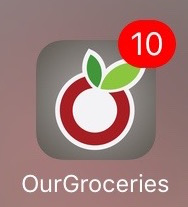
To hide it, launch the iOS Settings app. Its icon looks like this:

Scroll down and tap on “OurGroceries”, then tap “Notifications”, then turn off “Badge App Icon”.
Can I add items to OurGroceries using Amazon Alexa (Amazon Echo, Echo Dot, Amazon Tap)?
If you own an Amazon Echo, or any Alexa-enabled device, you can ask it to add items to your OurGroceries shopping lists using your voice. See the full instructions in the user guide.
Can you make a German version of the Alexa skill?
We’re not currently planning to make a German version of our Alexa skill. It has been surprisingly difficult to make an English version of a voice interface. It would take a lot more than a simple translation to make a German version, and we’d rather spend that time on features that all OurGroceries users can benefit from.
Requests
Can I import or export my lists and items?
Yes, see the User Guide sections on importing data and exporting data.
Can OurGroceries add items by scanning barcodes?
Yes! Note that our product database is rather U.S.-centric. Learn more about barcode scanning
Can OurGroceries keep track of prices?
We’ve had many requests for price tracking, and it’s on our list of features to add in a future update.
Can I keep some lists private?
We’ve had several requests for keeping some lists private, and it’s on our list of features to add in a future update.
Will you support IFTTT, Fitbit, or Samsung Gear?
IFTTT charges $3000 per year for integration, and we do not currently think that we would make that back in additional revenue.
We do not currently plan to support Fitbit devices or Samsung Gear watches.
Problems
My partner and I installed OurGroceries. Why are we seeing different lists?
You must both sign in to the same OurGroceries account. Learn more about accounts
A common mistake is for each person to create their own account with their own email address. This creates two unrelated and unconnected accounts. Pick one email address (either) for the account and sign in to it from all devices.
Another common problem is that the OurGroceries app may not have permission to contact our server. To check this, launch OurGroceries, go to the Settings screen, then to the “About” screen. This screen will tell you when it last contacted our server, which should always be less than 20 seconds ago. If it’s more than that, then the phone may be blocking OurGroceries. Launch the phone’s Settings app, find OurGroceries there, and see if it’s missing the permission to use the network.
Why are the website’s shopping lists different from those on my phone?
You must associate OurGroceries on your phone with your web account:
- If you’ve already entered an email address into OurGroceries on your phone (e.g., to share with your partner’s phone), then you must enter that same email address when signing in to “Your Lists” on the web site.
- If you’ve never entered an email address into OurGroceries on your phone, then set up list sharing now using the same email address that you used on the web. See above for instructions.
Remember to use the same email address for all your mobile devices and for the web interface. It’s what ties them all together and lets them synchronize with one another.
I followed the instructions. Why didn’t I receive a confirmation email?
These types of automated emails often get mis-classified as spam. We’ve seen problems with both Yahoo and Hotmail. Check your spam folder for the confirmation email.
Also, double-check the spelling of the email address you entered in OurGroceries. It’s easy to get one letter wrong, such as “gmail.con” instead of “gmail.com”.
Sometimes the Yahoo bulk-email folder is configured to delete spam immediately. If your spam folder is empty, do the following: Click “Options” in the upper-right, then “Mail Options” in the drop-down menu, then “Spam” in the left-hand pane. Look at the “Empty Spam folder” option. Make sure it’s set to anything other than “immediately”, then click “Save Changes” at the top. You’ll need to ask OurGroceries to send you the confirmation email again (see next paragraph).
To send the confirmation email again, launch OurGroceries, go to the Settings screen, and tap the Send button.
How do I stop sharing the list with my partner?
The partner who does not own the master email address (the address used for the OurGroceries account) should create a new OurGroceries account. You will both keep a copy of all shopping lists and recipes, but the lists will no longer be synchronized. Learn more about creating accounts
If you’re not in a position to ask your former partner to change their OurGroceries settings, then visit the Settings page on our website. From there you can see the list of devices in your account and remove the ones you no longer want to synchronize with.
How do I transfer my lists to my new phone?
First, be sure that your old phone (the one with OurGroceries installed and your lists on it) is signed in to your OurGroceries account. Do this by launching OurGroceries, going to the Settings screen, and then to the “Sign In” or “Account” screen. This screen will tell you whether you are signed in. If not, follow the on-screen instructions, or learn more here.
Then, on your new phone, repeat the above procedure with the same email address.
As a bonus, now that your email address is associated with your lists, you can use our website’s Your Lists section to view and modify your lists!
I cross off items by accident at the store.
You can make it harder to cross items off.
I add an item using Alexa, but the item does not show up on my list.
If it seems like Alexa does not even understand your request, then check a few things:
- Be sure that the OurGroceries skill is properly installed in your Alexa account. Use the Alexa app on your phone to check your list of installed skills. (Tap “Skills” in the menu on the left, then tap “Your Skills” in the upper-right.)
- If you have multiple profiles on your Alexa device, be sure that the active profile is the one you installed the skill on. It’s easiest to install the OurGroceries skill on all your profiles.
- Be sure to include the “ask OurGroceries” phrase when speaking, or Alexa will think that you’re adding an item to its built-in shopping list.
If Alexa acknowledges your request but the item does not show up on your phone’s list in OurGroceries, then there are two possibilities: One is that Alexa is adding items to her own list; the other is that she’s adding it to OurGroceries, but to a different account than the one that’s on your phone.
If, when you say, “Alexa, ask OurGroceries to add milk to (list name)” she replies with, “Added milk to (list name)”, then she’s adding it to OurGroceries. If instead she replies with, “I’ve added milk to your shopping list”, then she’s adding it to her own list. Be sure to install the OurGroceries skill and to phrase the request properly. See here for instructions.
To double-check that both Alexa’s OurGroceries skill and your phone are on the same OurGroceries account, follow these steps:
- On your phone, launch OurGroceries, go to the Settings screen, then tap “Sign in” or “Account”. The screen will tell you which account you are signed in to.
- Sign in to our website using that email address. Use the password you had previously created to sign in to Alexa. Go to the Settings page and verify at the bottom that “Amazon Alexa” is one of the devices, and that it was used recently (when you most recently added an item using Alexa). If not, then the OurGroceries skill on Alexa must be signed in to a different OurGroceries account. Remove the skill and add it again using the Alexa app on your phone.
In addition, after adding an item using Alexa, you can use the Alexa app on your phone to double-check what she thinks you said.
Adding items using Siri often does not work.
Starting with iOS 16.4 and watchOS 9.4, Apple changed the way Siri works, and often when using the previously recommended voice command “Hey Siri, using OurGroceries add milk,” the item will instead be added to the Apple Reminders app. This doesn’t happen all the time, and seems to happen with some items more than others. (For example, “milk” often works, and “bananas” often doesn’t.)
The Siri section of the user guide has been updated with wording which should work better, and to describe a new app shortcut for adding an item the default list, called “Add to OurGroceries”.
We have noticed that Siri works differently from user to user, likely because Siri has adapted to each user’s activity. We’ve also noticed that a Siri command that doesn’t work at first can later start working reliably. You can try asking Siri to open the OurGroceries app with: “Hey Siri, open OurGroceries”, to help Siri adapt to using OurGroceries.
Something that works well with Siri voice commands are OurGroceries custom shortcuts. A shortcut can be created to add an item to a specific list, or a shortcut can prompt you to name a list each time you add an item.
To create a custom shortcut for adding an item to a specific list, follow these steps:
- Open the Shortcuts app.
- Tap “+” in the upper right corner, then tap “Add Action”.
- Enter “OurGroceries” into the search box at the top and tap “Add Item to List”.
- Tap the blue “List” word within the action area and choose a specific list for this shortcut to add items to.
- Tap the “Add Item to List” title at the top of the screen and tap “Rename” to rename the shortcut based on the list that you chose (for example, “Add to Grocery List”). Tap “done” on the keyboard to save the new title.
- Tap “Done” to save the shortcut.
You can now add an item to the chosen list by saying “Hey Siri” followed by the name that you chose for your shortcut (for example, “Hey Siri, Add to Grocery List”). Siri will then prompt you to say the item to be added.
If you have more than one shopping list you would like to use with Siri, repeat the above steps to create a separate shortcut for each shopping list you want to use. Learn more about iOS Shortcuts.
On Android I can no longer choose how to send my list.
Normally, when you choose the “Send list” or “Send recipe” option from the shopping list or recipe menu, Android asks you which app you want to use to send the list. If you tap the “Just once” button, Android will ask you again next time. If you instead tap the “Always” button, then Android will remember your choice and you will no longer be asked which app to use to send your list or recipe.
If you accidentally tapped “Always” and would like to go back to being asked each time, then do the following:
- Launch the Android Settings app.
- Find the “Apps & notifications” section. It may just be called “Apps” on your version of Android.
- Find the app that was set to always be used. This is not OurGroceries, this is the app that comes up automatically when you are trying to send your list (for example, your email program, or Facebook).
- Find “Open by default”.
- Tap the “Clear Defaults” button.
OurGroceries on my Apple Watch won’t connect.
When you first launch the OurGroceries app on your Apple Watch, it will ask you to launch the OurGroceries app on your iPhone. This should immediately “pair” the two, but sometimes this doesn’t work. It seems that in some cases, Apple Watch doesn’t recognize that the watch app and the phone app are both part of the same app and should be linked.
We recommend trying the following, in order, until one of them works:
- Uninstall and re-install the OurGroceries watch app (from the iPhone’s “Watch” app).
- Uninstall both the OurGroceries watch app and the OurGroceries phone app, and then re-install the OurGroceries phone app from the App Store. Then install the watch app. Make sure list sharing is set up first so you don’t lose your lists!
- Unpair your Apple Watch from your iPhone. Then re-pair your watch to your iPhone. We know this is a pain and takes a long time, but in at least one case this was the only way we found to force Apple Watch to fix the problem.
I accidentally deleted a shopping list!
Unfortunately there’s no way to get a shopping list back, but it’s fairly easy to re-create it, along with the photos that were with each item:
- Make sure that the “Add multiple items” preference is turned on. Learn more
- Make sure that the master list is ordered with common items first. Learn more
- Create a new empty list, tap “Add an item”, then tap as many items as you can remember. The items you added most often will be on top of the list, so it’ll be pretty quick to restore most of your original list.
Items are showing up in my list that I didn’t add.
You might find an item in your shopping list with the note “Someone in your household tapped “Add to List” on an ad for this item.” We occasionally show ads that have an “Add to List” button. If you tap this ad, the advertised product will be added to your shopping list. We put that note on the item so that you’ll know where the item came from. If you don’t want the item, you can cross it off or just delete it.
If you don’t remember tapping such an ad, then it’s possible that you or someone in your household tapped it by accident (for example, while the phone was unlocked in your hand or in your pocket). If you’re curious about who in your household added it and when, please contact us and tell us the email address you use for your OurGroceries account and the name of the item and we’ll look up the information for you.
Bitwarden tries to save my item names.
The password manager Bitwarden has a known bug on Android where it thinks that the item name in the “Add an Item” screen of OurGroceries is a password, and asks you if you want to save it. They’re working on a fix. In the meantime, you can add OurGroceries to a list of apps that Bitwarden will ignore completely. Follow their instructions and specify this URI: androidapp://com.headcode.ourgroceries
Google voice commands
What happened to OurGroceries voice commands in June 2023?
Google made substantial changes to the way voice commands work, and this affects third party apps like OurGroceries. We are disappointed by this news, but it is Google’s decision, not ours.
The following changes took effect on June 13, 2023:
- Google Home and Google Nest: Third party voice apps are no longer permitted by Google. This means OurGroceries voice commands are no longer available on these products.
- Android phone and Wear OS watch: Some rarely used voice commands were removed. OurGroceries voice commands are still supported on these products. See this question for details.
Will all my lists and items created with OurGroceries voice commands be kept?
Yes. All of your lists and items are safe, and are unaffected by this change.
Is anything changing about OurGroceries voice commands on Amazon Alexa, Apple iPhone, or Apple Watch?
No, OurGroceries voice commands on these products still work the same way they always have.
How do I continue using OurGroceries voice commands if I’ve been using a Google Nest or Google Home?
Third party voice apps are no longer permitted on Google Nest and Google Home, which means OurGroceries voice commands are no longer available on these products.
To continue using OurGroceries voice commands you can consider any of the other platforms that have OurGroceries voice command support, including our Android, Wear OS, iOS, Apple Watch, Alexa, and Siri apps. This includes products such as Amazon Echo and other smart speakers with Alexa support, iPhone and Android devices, and Apple HomePods, among others.
Are OurGroceries voice commands for Android phones or Wear OS watches changing?
The most important OurGroceries voice commands are still supported on these products:
- “Hey Google, ask OurGroceries to add milk.”
- “Hey Google, ask OurGroceries to add milk to Costco.”
- “Hey Google, add milk to OurGroceries.”
- “Hey Google, add milk to Costco on OurGroceries.”
Some rarely used voice commands were removed:
- “Hey Google, ask OurGroceries what are my lists.”
- “Hey Google, ask OurGroceries what is on the groceries list.”
- “Hey Google, ask OurGroceries if milk is on Safeway list.”
- “Hey Google, tell OurGroceries to remove milk from groceries.”
- “Hey Google, ask OurGroceries to increase carrots.”
If you have any questions or suggestions about our voice commands on Android phones or Wear OS watches, please contact us at support@ourgroceries.com.
Why is OurGroceries making these changes?
We are only making these changes because we are being forced to.
OurGroceries uses Google technologies to respond to voice commands on Android, Wear OS, Google Home, and Google Nest products. Google changed how they support voice commands on these devices, and we must adapt to what is possible. We are disappointed by this and don’t like to remove things from our product that people are still using, and we will continue to work on the best possible ways to offer voice commands on Google’s products as the situation evolves.